August 21, 2007

The Shopping List

A couple nights ago, my son and I were in a store with a list of grocery items to purchase. My wife had given the list to our son and he was calling out a few items at a time. If he called out too many items, I'd forget them all and ask him to start over. When he called out something that I knew was nearby, we'd head in that direction and get that item. Darting back and forth may not be a very efficient way to shop, but it likely costs me less than systematically going through the store. When I go grocery shopping with an always-hungry 10 year old boy, it is very likely that we will buy twice as much stuff as is on our list.

Although he will claim that I always say "no", my son is skilled at talking his dad into buying things. In this trip to the store, he first asked for some expensive pastries knowing that I would say no -- like I always do. :) Then he proposed the cookies that I think he really wanted and gave me a well-thought-out argument as to why these were better and cheaper. The cookies found their way into our cart.

I wasn't very concerned about the accuracy of our selections because my wife was elsewhere in the store helping our daughter find some new gym pants for school. I knew that my selections would be tested before I paid for anything. Should anything not pass the inspection, I knew I could put it back and replace it with the correct item.

This trip to the store reminded me of a shopping trip a couple months back. My wife gave me a hand-written shopping list containing the text shown below.

DVD Lens Cleaner
Toilet Paper - get extra
canned dog & cat, kitty litter
Tea Tree Oil
Lined paper - college ruled
Mech. pencil 0.7
hamburger meat, chicken tenders tenderloin
cone shaped coffee filters
white vinegar 64oz - same isle ^
canned tuna fish
crackers - saltines + Ritz
Doritos
Fig Newtons Maple Syrup
reg. coke + apple soda
Dairy section
coffee creamer, eggs, yogurt
cheese
variety juices from freezer section
plus lemonade
Grapes
Pears - bartlett

As I worked my way though the list, I noticed that the level of detail specified for each item varied. Some things contained specifics while others did not. However, there is much implied in the list that is not written. How do I know that there is much implied? I've been married to Sophie for 16 years. I know my wife and she knows me. At least that's what I like to think.


She knows that she has to specify regular Coke because I'd buy Diet Coke if she didn't tell me otherwise. She also knows that I know that when she writes "apple soda", she is referring to a specific brand of apple flavored soda pop.

She did not specify what kind of toilet paper to buy but I have learned from experience which brands she will find to be acceptable. I had no idea how much was extra, so I ensured that we would not run out anytime soon.

She wrote "canned dog & cat", knowing that I would joke about not finding canned dog or cat meat in the store while understanding that I should get canned dog food and canned cat food.

She specifically told me what shape coffee filter to buy because she had recently bought a new coffee maker that requires a different shaped filter. Had she not told me which shape, I would have likely bought the wrong kind: the kind I had been buying for years. However, I discovered that there is more than one style and size of cone shaped coffee filter. I did my best to guess as to what size the new coffee maker used. I had not yet used the new coffee maker, but I had seen it. Then, before I left the store, I called home to confirm that I selected the right size.

From a conversation before I went to the store, I knew that the "canned tuna fish" was for the cats. I made an executive decision and bought tuna flavored cat food because it cost less. If I didn't know this, I might have thought that the tuna was to put on the crackers for our lunch.

I knew that "Fig Newtons" did not require that I buy that specific brand of fig bars. I also knew from experience that there were some brands I should not buy.

I am intelligent enough to know that the maple syrup is a separate item from the fig bars. However, I did not know if Sophie wanted real maple syrup or if maple flavored corn syrup would do. I bought both.

The list did not say anything about what kind of cheese I should buy but I knew what kind of cheeses we usually eat and made a guess.

I knew that "coffee creamer" came with many unwritten requirements that I have learned from shopping with my wife.

I knew what "variety juices" my family will drink and what they will not drink.

I knew that if I made a mistake in my selection of items, I might have to make another trip to the store. I was more careful in my selections than I am when Sophie is in the store. I double checked my list before I left the store.

I got most of the items right. The coffee filters fit the new coffee pot. I didn't get the vinegar right in spite of the more detailed directions about type, size, and location. And, I totally forgot the most important item on the list: the chocolate.

So, what do my shopping adventures have to do with software testing? Very much.

  1. Written requirements are only part of the story
  2. Explicit written requirements cannot fully communicate user needs
  3. Requirements may be communicated in passing
  4. Communication before, during, and after implementation is essential
  5. Familiarity improves the success rate -- and makes requirements definition easier
  6. Unit testing by implementers does not ensure success
  7. User acceptance testing earlier in the process costs less than waiting until the end
  8. Context frames everything

After nearly 16 years of marriage, I failed to completely meet expectations implementing something as simple as a shopping list.

And yet we expect people on software projects, that hardly know each other, to understand each other's desires.

What else can we learn from shopping lists?

August 18, 2007

Failure Usability

One of my pet peeves about software is bad error messages. In my view, a bad error message is one that does not tell the user how the error impacts them and what they need to do in response to the error. Too many messages fail to communicate this information in terms that the software's user is going to understand. Too many of these messages are written for developers, not users.

There is a place for error logging in terms that help developers and testers troubleshoot and fix problems. This information is often best written to log files, not displayed in the user interface.

Pradeep Soundararajan and I recently discussed some of our experiences with error messages. You can listen to excerpts from this conversation using the link below.


After the above conversation, Pradeep walked me through an exercise that demonstrated a case in a popular office application in which I, the user, was not sufficiently informed that an error was occurring. It was obvious that the actions I was trying to perform were not functioning but the software gave me no clear indication of why it did not work as I expected.

Good testers recognize the need to include "negative testing" in their search for significant bugs. Testing for errors is a common part of functional testing. Let's go beyond functional testing of errors. Let's test errors for usability.

Here is an error testing mnemonic I created after our conversation.

  • Functional
  • Appropriate (or Apropos*)
  • Impact
  • Log
  • UI
  • Recovery
  • Emotions

Functional
Does the error detection and reporting function as required? Are errors not detected that should be detected? Are errors reported? Do error dialogs function as expected? Do the buttons work?


Appropriate (or Apropos*)
Are errors detected and reported in an accurate and timely manner for the intended audience? Are errors reported as soon as an error condition is met? Are warning messages displayed while there are enough resources to remedy the problem? Is a user allowed to waste time and effort only to be told that their work cannot be applied? Is the text of a message accurate? Does the text convey the situation to the intended audience? Is the error described in terms that will be understood by the intended audience?

Impact
Is the impact of the error sufficiently communicated to the user? Does the message contain too little information for the user to understand what occurred and how it impacts what they were attempting to do? Does the message contain extra information that distracts from communicating the impact?

Log
Does technical information need to be logged for support, system administrators, developers, or testers? Will this log information be available if the user waits to contact support? Are log messages standardized to allow for automated information mining? Are logs detailed enough to facilitate troubleshooting? Are errors logged that add no value? Is there too much logging? Does excessive logging negatively impact performance and disk space? Does excessive logging complicate error investigation?

UI
Are users given some indication that what they attempted to do failed? Are user interface messages worded for the intended audience? Are user interface error messages consistent with the look and feel of the software? Are error messages consistent with other activity that causes the same error elsewhere in the application? Are errors communicated in an efficient manner? Does a user need to click away excessive dialogs? Is this error best communicated as an error dialog? Is this error best communicated as text added to the window? Is this error best communicated audibly?

Recovery
Does the error message tell the user how to recover from the error condition? Does the software facilitate recovery? If needed, is contact information provided? Is the user prompted through the recovery or left to figure it out on their own?

Emotions
What emotions are likely to be raised by the error message? Does the information in the message add to a user's frustration or help quiet it? If a user is being told that they need to pay more to use a feature, does the message encourage them to upgrade or does it encourage them to find a competitor's product? Does the error message cause more confusion?


Here's an error message Pradeep gave me to help test the mnemonic. What faults can you find in the error message using the mnemonic?


The next time you see an error message -- or don't see one that you should -- don't stop at functionality. Check the rest of the FAILURE. (And look here for a PowerPoint show demonstrating the mnemonic.)


PS: While attempting to save this post, Blogger gave me the following error. This error fails many of the tests above. The second save button distracted me from the light grey error message. Trying again did not fix the problem. It was not clear if the error meant that my text had been saved or not. I finally had to copy the HTML of the post and paste it into a new Blogger session. Bad error reporting is easy to find. :)


* UDATE: 18 Aug 2007 @ 6:32 PM: Michael Bolton suggested that "Appropriate" would be more appropriate than "Apropos". After some consideration, I agree. Thanks Michael.

August 15, 2007

Excuses, Excuses


I have heard a variety of responses from developers in response to bugs I report. Some are good, some bad, and some are just plain ugly. Here are a few handfuls.

  • That's strange.
  • How'd you do that?
  • It works on my machine.
  • I already fixed that. You'll have it in the next build.
  • No user would do that.
  • That's not how you're supposed to do that.
  • It's a data problem. Tell the users to fix the data.
  • That's a cool bug! Show me again.
  • I didn't touch that code.
  • It works as designed.
  • It works as coded. [Well, duh. What else would it do?]
  • That's not a bug, it's a feature.
  • I can't test everything.
  • Thank you.
... and my absolute favorite (this came from a development manager)

  • Don't judge it, just test it.

The difference between the good and bad is often the relationship between developer and tester. Testers need developers to create something to test. Respect your developers. Communicate with respect and help turn the ugly responses into good responses.

As I've heard James Bach say: Testers don't create quality. Developers create quality.

What's your favorite bug report response?

August 8, 2007

Things We Know

 Charles Maxwell: Shark attacks helicopter I find it at work. I find it in online forums. I find it in books. I find it in papers. I find it in blogs. I find it at conferences.

I hear it from experts. I hear it from freshers. I hear it from friends. I hear it from managers. I sometimes even hear it come out of my own mouth.

It influences testers. It influences developers. It influences managers that influence testers and developers. It impacts customers.

It wastes time. It wastes money. It frustrates developers. It confuses executives. It demeans testers. It decreases quality in the name of improvement.

It permeates the practice of developing and testing software.


What is this ubiquitous it?


It is testing folklore.


It ain’t so much the things we don’t know that gets us in trouble. It’s the things we know that ain’t so.
- Artemus Ward


Here are some examples I pulled off the top of my head:
  • There are best practices
  • Tool vendors know those best practices
  • The right tools make good testing
  • Testers are the enemies of developers
  • Automated unit testing is the only testing we need
  • Written requirements are needed for testing
  • It is possible to document unambiguous requirements
  • Repeatability is maturity
  • Tests can be completely designed and scripted before execution
  • Testing is simple if guided by the right process
  • Quality can be tested into a product
  • Good manual testing can be replaced by automation
  • Automation is only good for regression testing
  • Test case counts are a good measure of test status
  • All web pages should load in under 6 seconds
  • Testers need to have development skills
  • Good testing can be pre-scripted to be executed by anyone that can follow directions
  • Boundaries are easy to identify
  • Most bugs occur at boundaries
  • Testing is easily outsourced to unintelligent people
  • Testing is easily outsourced to tools
  • Increased testing effort improves quality
What folklore do you encounter?

It is time to unlearn those things we know that ain't so. Challenge the folklore. Ask questions.

  • Who says so?
  • How do they know?
  • What are they missing?
  • Does it apply to my context?
  • Does it make sense?

Maybe its time to call Mythbusters.

August 4, 2007

Extreme Telecommuting


"Ten years ago, there's no way this would have worked. Now there are hardly any barriers."

- Anthony Page

Many of us spend most of our days trapped in a cubical or windowless office. At times I have enjoyed the opportunity to telecommute from home. I've had some good and bad home offices over the years. I've worked with great views and I've worked in basements. I'm a bit envious of James Bach's new digs.

I have the pleasure of working from home one day a week. I look forward to this day because I don't have to deal with traffic, I can work in the comfort of my own home, and I can get work done with fewer interruptions.

Earlier this week, I came across a CNN story about telecommuters that don't work from home. These telecommuters work from wherever they want to be. They are working globetrotters. Today's technology makes it possible for many people to work from anywhere in the world. I think we are still some time away from this being an option for many employees. However, it may be a viable option for contract work. If work can be outsourced to anywhere in the world, why not a beach or mountain top?

"People ask me where I live, and I'm not sure what to say, I'm not sure where I live. I live in the world."
- Trygve Inda

If you could be an extreme telecommuter, from where would you work?

July 25, 2007

For Better or For Worse


I just stumbled across a 1986 quote from then-president of now defunct Ashton-Tate. I think it has application to automation in software testing.

"A computer will not make a good manager out of a bad manager.

It makes a good manager better faster and a bad manager worse faster."

-Ed Esber

All software is automation. Therefore, all software testing involves some level of automation.

Automation has potential to do good or bad faster. And, faster is not necessarily better.

Let's be smart about how and what we automate.

Keys to Innovation

Lee Copeland's CAST keynote address referenced in a previous post was not only about books. Good books was one of the items on Lee's list of eight recent innovations in software testing. Lee's complete list is shown below.

Innovations in Software Testing
(Lee Copeland's List)
  1. Context-Driven School
  2. Testing Specialties
  3. Test-First Development
  4. Really Good Books
  5. Open Source Tools
  6. Session-Based Test Management
  7. Testing Workshops
  8. Certification

I was glad to see most of the items on this list. I am especially happy to see the Context-Driven School and Session-Based Test Management on the list. I believe that these have had a significant impact on software testing and have great potential that has not yet been realized.

Tester certification may be an innovation but I don't think its impact has been good. In my opinion, the current certification options are bad. (There was a certification debate hosted by AST at CAST this year. Please take a look at Tim Coulter's review: AST Certification Debate.) Most of the certifications show nothing more than one's ability to pass a certification exam. And, many of the certifications are based on context-free and outdated views and techniques. I reviewed some ISTQB sample questions with a group of very smart testers and we could not identify a correct answer for many of the questions. We could, however, make a good guess at what we thought was expected by the exam writers. Matters of opinion and guessing at implied contexts should not be the basis for any exam. I think the following statement summarizes this concern quite well.

We don’t mind that some people hold (and teach) views or techniques that we consider antiquated. We do mind that in prep courses that teach you how to pass “objective” exams, there is no place for presentation of controversy or thoughtful analysis of the fundamentals.
- Cem Kaner and Tim Coulter

Now back to Innovations...

In typical CAST style, Lee asked the audience for things they thought he missed. The audience came up with the following additions. Yes, Model-Based Testing was mentioned twice -- followed by applause from Harry Robinson. :)

  1. Collaborative groups
  2. Model-Based Testing - specifically model-based automation
  3. Testers help define what is correct - testing is more than comparing dictated expected and actual results
  4. Model-Based Testing
  5. Fluidity - not freezing plans - recognizing the need to be adaptable
  6. Study of software development and testing history - learning from the past
  7. Toolsmithing
  8. Ethnomethodology - the study of common sense (guess who this came from)
  9. Test management as project management
  10. High volume semi-random test automation
  11. Academic research in testing techniques
  12. Prediction based on source code

What would you add to the innovations list?

What innovations do you think might be just over the horizon?

July 12, 2007

Woodpeckers, Pinatas, and Dead Horses

Here's some short blurbs of a few things I took away from CAST sessions.

From Lee Copeland's keynote address:
  • "It's nonsensical to talk about automated tests as if they were automated human testing."
  • Write or speak about something you're knowledgeable and passionate about.
  • Combine things from multiple disciplines.

From Harry Robinson's keynote address:
  • Weinberg's Second Law: If Builders Built Buildings The Way Programmers Write Programs, Then The First Woodpecker That Came Along Would Destroy Civilization.

From Esther Derby's keynote:
  • To successfully coach someone, they must want to be coached and want to be coached by you.

From James Bach's tutorial:
  • Pinata Heuristic: Keep beating at it until the candy comes out. ... and stop once the candy drops.
unless ...
  • Dead Horse Heuristic: You may be beating a dead horse.
yet beware ...
  • If it is a pinata, don't stop beating at it until the candy drops; but if it is a dead horse, your beating is bringing no value. It can be a challenge to determine if its a pinata or a dead horse.
From Antti Kervinen's presentation:
  • Separate automation models into high level (behavior) and low level (behavior implementation) components to reuse test models on a variety of platforms and configurations.

More from James Bach's tutorial:
  • Testing does not break software. Testing dispels illusions.
  • Rational Unified Process is none of the three. (attributed to Jerry Weinberg)

From the tester exhibition:

  • Testing what can't be fixed or controlled may be of little value. Some things may not be worth testing.
  • There is great value in the diversity of approaches and skills on a test team.
  • It may be possible to beat a dead horse and test (and analyze) too much. Sometimes we should just stop testing and act on the information we have.

From Doug Hoffman's tutorial:
  • Record and playback automation can be very useful for testing for the same behavior with many configurations. And, once the script stops finding errors: throw it out.

From Keith Stobie's keynote:
  • Reduce the paths though your system to improve quality. Fewer features may be better.
  • Free web sites often have higher quality than subscription sites. This is because it is easy to measure the cost of downtime on ad-supported systems.

From David Gilbert's session:
  • People expect hurricanes to blow around and change path. We should expect the same with software development projects. (David has some interesting ideas about forecasting in software development.)
  • Numbers tell a story only in context. You must understand the story behind the numbers.
One more from James:
  • Keep Notes!


What did you take away from CAST?

Exploratory Scripted Automated Manual Testing


Exploratory testing is often said to be the opposite of scripted testing. Automated testing is often said to be the opposite of manual testing. Instead of selecting one or the other, I find it helpful to look at these as opposite ends of spectra. I believe good testing contains components spread throughout multiple spectra.

I think we get into trouble when we apply these labels to “testing” as a whole. I believe all software testing has some aspects that are exploratory, some scripted, some automated*, and some manual. Hopefully all are driven by sapience.

Here are some things I remember about one of the best testing projects in my experience:

• Organizational testing processes were well documented
• Requirements were well documented
• We had enforceable quantitative requirements
• Tests were well planned
• Test plans were well documented
• Test cases were well defined and traceable to requirements
• Tests were well scripted
• Automation was an integral part of the testing

All of the above look like attributes of scripted, plan everything first, testing. We did a lot of planning and scripting for this testing. However, the following things are also true for this testing project:

• Process and documentation requirements were adaptable to the context
• Test "script" execution was mostly exploratory and mostly manual
• Bugs were only reported and officially logged if they were not fixed quickly
• Many requirements were qualitative
• Automation was “driven” by human testers


This scripted exploratory automated manual testing worked very well in its context. It was both the most scripted and most exploratory testing I can think of at the moment: it was the best testing.

Exploration does not mean leaving the map at home. Exploration is not the same as wandering. Testing was well planned while being exploratory in nature and practice. Human beings were involved at every step of the test planning and execution. Introducing automation reduced each iteration’s the test execution time from weeks to days without removing the human tester.

This testing was exploratory. It was dynamic. It was also well
scripted. The combination of static and dynamic components was central to the success of the project.

Instead of thinking of performing exploratory or scripted or automated or manual tests, find the balance of the four to create testing that works best in each situation.


* If you think no aspect of your testing is automated, try testing the software without a computer. And now that I wrote that, I am thinking of software tests that may not require a computer or software. It all depends on context. :)

July 10, 2007

Read any good books lately?


"I've never read a book about software testing."

- too many testers

In a CAST keynote address about recent innovations in software testing, Lee Copeland relayed a story about asking all the testers at a large respected financial company about their favorite software testing books. Lee said that every one of the testers said they had never read a book about software testing.

Lee compared this to a surgeon informing a patient that they've never read a book about surgery, but not to worry because they are a good surgeon.

I too have asked a number of testers about their training to be a tester and have often received responses similar to those reported by Lee.

I want to pass on Lee's encouragement to read. Lee also heralded the benefits of applying lessons learned outside technology fields to testing (e.g., philosophy and psychology) to software testing.

There was a time that there weren't many testing books from which to choose. This has changed. Today, there are many. There are some good books out there, but there are also some terrible books that promote practices that have not adapted to the past 30 years of advances in software development.

The list in the sidebar of this blog contains some books I've found useful in software testing. Inclusion in this list does not imply my endorsement of everything in the book. I don't necessarily agree with a book to like it. To me, a good book is one that makes me think.

What good testing books have you read?

July 8, 2007

Too much testing?

In a recent blog post, Jason Gorman provides some thoughts about the following question:

How much testing is too much?
To me, this is like asking "how much cheese would it take to sink a battleship?" There probably is an answer - a real amount of cheese that really would sink a battleship. But very few of us are ever likely to see that amount of cheese in one place in our lifetimes.
As Jason states, we may never encounter too much testing. However, I believe that we testers often include too much repetition in our testing and miss many bugs that are waiting to be discovered. This becomes especially likely when we limit our testing to scripted testing or put our test plans in freezers. Repeating scripted tests -- whether manual or automated -- is unlikely to find new bugs. To find new bugs, we testers need to step outside the path cleared by previous testing and explore new paths through the subject of our testing.


Executing the same tests over and over again is like a grade school teacher giving a class the same spelling list and test each week. The children will eventually learn to spell the words on the list and ace the test; but this does not help them learn to spell any new words. At some point, the repeated testing stops adding value.
If you have men who will only come if they know there is a good road, I don't want them. I want men who will come if there is no road at all.
Like Dr. Livingstone, I want testers that are willing to explore paths that have not been trampled by the testers that went before them. I want automated tests to go out like probe droids and bring back useful information. I want each manual tester on a team to think and explore the system under test in a different manner than the rest. There is a time and place for repeatable consistency, but that's just a part of testing. Real human users don't follow our test scripts. I don't want testing to be limited to testers and robots (automation) that follow scripts through pre-cleared paths.


Want to learn more about exploratory testing?


Try exploring the web with Google or your favorite search engine:

July 6, 2007

I'm a user and I just did that


Michael Bolton just blogged about the sometimes common exchange between testers and developers that often goes something like this:

TESTER: I found this really important bug. Look at this. Let me show you ...

DEVELOPER: No user would do that.

TESTER: But, I'm a user and I just did that.

DEVELOPER: But, the real users won't do that.

Michael states that what the developer really means is "No user that I've thought of, and that I like, would do that on purpose." This is very true. Michael also points out that we testers are not the real users and may do things that the real users are not expected to do.

Thinking of users that the developer did not think of is an important service we testers provide. This becomes especially important when we put applications on the Internet. We need to consider the users and user behavior that the developers did not consider. I believe it is our responsibility as testers to tactfully provide the development team with the information they need to make an informed decision about what real users might do. We can't stop the conversation at "I just did that and I'm a user." We can communicate the likelihood and impact of users doing what the developer's friendly users won't do.

Michael's post reminds me of two such recent exchanges.

The first was a bug that was the result of developers (and project managers, and business folks) assuming that all users would do something in only one of several possible ways of performing an activity. The application worked as expected if users behaved as the development team expected. However, if a user did not behave as expected that user would be locked out of future access to this system. Paying customers aren't likely to be happy when they can't access the service for which they paid. After the initial exchange that went much like the sample above, it took only a few minutes of my time to document how easy it was to get locked out of the system and why real users would not be happy with getting locked out. It also took only a few minutes to walk a project manager through the process of locking himself out of his system. The design was changed to account for the user behavior that was not originally considered.

The second was a bug that caused errors in a web application when a user selected list items in an unexpected manner. Further investigation revealed that a single user's actions could impact the performance for all users of all applications residing on the application server processing a user's activity. A single user could peg the application server's CPUs with the flick of a finger. The cause of the errors and performance issues was that this method of selecting list items triggered numerous page refresh requests as a user viewed the available options. Development's first response was that no user would do that. I then explained that I am a user of web applications and I often do what caused the problem. I wasn't even intentionally testing the functionality with the bug when I discovered it. It was only after demonstrating how easy it was to cause the problem and its impact on other users that the problem was addressed. Had I stopped at the start, the problem would not have been fixed. Had I just stood my ground and pointed fingers while insisting that it be fix, the problem may not have been fixed.

When I hear that no user would do something, I usually respond with "I just did that, and I'm a user" but I don't stop there. Like a good attorney, we need to convince our audience of our case for fixing a bug or adding an enhancement.

Bugs need good solicitors.

June 27, 2007

Ugly Babies: Another Reason Why We Need Testers

... I got on the train ... And I noticed that the woman across from me in the aisle had her baby with her. Ugly baby. Ugly baby.

From the other end of the coach comes this guy and he was very drunk and he was staring at the baby. ... And the guy said, "I'm looking at that ugly baby. That's a horrible looking baby lady. Where'd you get that baby from?"

And the woman said, "I don't have to take that!" And she snatched the emergency cord and the train came to a screeching halt, and the conductor came running in.

Now this was his moment. At this moment he represented the Pennsylvania Railroad. And he said, "what's going on here?"

And the woman said, "This man just insulted me. I don't have to spend my money and ride this railroad and be insulted. I'd rather walk."

And the conductor said, "calm down! Calm down! Madame there's nothing, nothing that the Pennsylvania Railroad will not do to avoid having situations such as this. Perhaps it would be more to your convenience if we were to ... let you sit somewhere else in the coach. And as a small compensation from the railroad ... we are going to give you a free meal; and maybe we'll find a banana for your monkey."

- Flip Wilson


We are like parents when it comes to our creations: we can be blind to ugly.

I am a believer in developer testing. Good unit testing is essential to good software. Practices like Test Driven Development (TDD) help ensure that software works from the start. Anyone that's been in the software development business for long knows that the cost of defects exponentially grows as a project progresses. Preventing and finding defects early should be a goal in every software project. Early testing by developers does not remove the need for testing by someone other than the coder.

There are a number of reasons for "independent" testing. These reasons often include references to requirements testing, end-to-end testing, integration testing, system testing, and independent verification. These reasons focus on testing things as complete systems or from a user's viewpoint. I have another reason: Creators can be blind to ugly.

Creators have an emotional attachment to their creation. This attachment can get in the way of objective evaluation. It is difficult to be both creator and critic. It is as if creativity and critique are opposite sides of a scale. We can be both, but increasing one can harm the other. Creators need to balance the two without allowing self-criticism to hamper creativity.

I think its good for creators to have an emotional attachment to the product of their thoughts and labor. External critics can help a creator improve their creation without stifling creative thinking.

Creating and critiquing are separate skills. When one group can focus on one and another group can focus on the other: together they are stronger (if the critics are more tactful than the drunk in Flip's story).

At least that's my opinion. Now I open the floor to the critics. :)

June 24, 2007

Software Development Life Cycle Explained

A couple weeks back, there was some discussion on the software-testing group about the use of the term "SDLC" on resumes. (Matt Heusser posted some excerpts from this conversation here.) My warning flags go up when people claim to have a "full understanding" of the SDLC. I sometimes see this as an indication that someone may not be as experienced as they claim. The "SDLC" will vary from one company to another and even one project to another. SDLC is a process documentation term -- and there are many differing processes used to develop software. Its not how people talk in the real world.

I recently re-stumbled upon a description of the SDLC that seems to be fairly common across many companies and projects. Perhaps this is what people are referring to when they claim full knowledge of the SDLC. :)

Software doesn’t just appear on the shelves by magic. That program shrink-wrapped inside the box along with the indecipherable manual and 12-paragraph disclaimer notice actually came to you by way of an elaborate path, through the most rigid quality control on the planet. Here, shared for the first time with the general public, are the inside details of the program development cycle.

  1. Programmer produces code he believes is bug-free.

  2. Product is tested. 20 bugs are found.

  3. Programmer fixes 10 of the bugs and explains to the testing department that the other 10 aren’t really bugs.

  4. Testing department finds that five of the fixes didn’t work and discovers 15 new bugs.

  5. See 3.

  6. See 4.

  7. See 5.

  8. See 6.

  9. See 7.

  10. See 8.

  11. Due to marketing pressure and an extremely pre-mature product announcement based on over-optimistic programming schedule, the product is released.

  12. Users find 137 new bugs.

  13. Original programmer, having cashed his royalty check, is nowhere to be found.

  14. Newly-assembled programming team fixes almost all of the 137 bugs, but introduce 456 new ones.

  15. Original programmer sends underpaid testing department a postcard from Fiji. Entire testing department quits.

  16. Company is bought in a hostile takeover by competitor using profits from their latest release, which had 783 bugs.

  17. New CEO is brought in by board of directors. He hires programmer to redo program from scratch.

  18. Programmer produces code he believes is bug-free.

Even the above demonstrates some naivete.

Bugs are not necessarily the fault of a developer. Many bugs are defects in the requirements and design; not the code of any specific developer.

Developers rarely get royalty checks or bonuses.

I've never known of a "testing department" serving a single "developer". Now that's quite some tester to developer ratio.

Perhaps "SDLC" is just a term we use to model something that is really complex.

June 23, 2007

How many load generators do I need?


How many load generators do I need to run a [insert number here] user load test on a web application?

I am often asked how many load generators are needed for a load test with a certain number of simulated users.

My answer: It depends.

It depends on the system under test. It depends on your test tool. It depends on your specific script. It depends on your load generation hardware.

There is no straight forward answer to this question. There is no formula that can be used to extrapolate an answer. There is no one-size-fits-all rule of thumb. Some tool vendors will attempt to provide an answer, but they are wrong. I once spent a half hour arguing with a tool vendor support representative that claimed that I could run 200, and no more than 200, simulated users per load generator regardless of what those simulated users did or what hardware I used to host them. I had successfully simulated 1200 users with this tool for one script but could not simulate 50 users with another script. The number I could run on that same piece of hardware varied depending on the script.

The real question being asked is: How much load can I put on a load generator without impacting performance?

Isn't this one of the most common questions that load testing attempts to answer? Performance testers, of all people, should understand that there is no single formula for determining how much load you can place on a load generator system.

That "system" includes computers, software on those computers, and the network between the load generation computers and the system under test. To determine the requirements for this system we need to monitor that entire system. We need to monitor CPU usage. We need to monitor memory usage. We need to monitor whatever other system resources the script and test tool may impact. We need to monitor bandwidth usage. We need to monitor at the start of a test and at the end of a test. We need to monitor and load test the load generation environment just as much as we need to monitor and test the system under test.

So, where do we start?

Test the test environment. I start by running a small number of simulated users from a single load generator system. I monitor the system resources on the load generator. I estimate the bandwidth between me and the system under test. Once I have system resource numbers for my small number of simulated users, I extrapolate how many I think can run on the system and I test it. If I find that it is too many, I decrease the number of users. If I think my environment can support more, I will test that.

Even when I think I know the answer, I monitor the test environment during load tests. This gives me information should I ever question the environment. Sometimes I discover that something in my test environment is the bottleneck and not the system I am testing. When this happens, we need to be willing to say "oops" and try again.

My real concern.

My real concern about such questions is not the answer, but that they are being asked with an expectation for a formulaic answer; and they are being asked by people that are designing, executing, and analysing load tests. The following may seem harsh, but I believe it to be true:

I believe anyone that is looking for a one-size-fits-all answer to the question of how many load generators are required should not be leading any load testing.

They should not be designing tests. They should not be analyzing results. They may be able to safely script what other people have designed. Even new load testers quickly learn (if they are paying attention) that even minor changes in activity within an application can impact performance and the load generated on the system under test.

There are no one-size-fits-all answers. That's why we test. Understanding this should be requirement #1 for selecting any load tester.

What is a new load tester to do?

1) Educate yourself.

Most people I talk to got into load testing without much direction. This was also the case for me. There seems to be a perception that anyone can learn a tool and be a great load testers. This tool-centric emphasis often leads people astray. Some smart people I know at a leading tool vendor even tell me that their training is just the introduction. I encourage all new load testers to seek education in addition to the formal vendor training.

Some great resources on the web are:

Get to know your tools. However, it is more important to get to know performance testing. The tools are the easy part.

2) Befriend experienced load testers, network engineers, systems engineers, systems adminstrators, developers, and anyone else that may have useful information.

It is disappointing that new testers are often sent out into unchartered territory all by themselves. This has happened to me. I don't like being set up to fail. I don't like seeing other people being set up to fail.

So, why didn't I sink? I had some great mentors that helped keep me afloat. These mentors were rarely assigned to a project with me, so I had to seek them out.

Learn to ask questions. Performance and load testing often requires information gathering from more sources than any other testing. Asking questions is part of the job. If you don't understand something, seek out the answer. If you're embarassed to ask publically within your project team, ask someone privately. Look for resources outside your project. Find others in and outside your company that are willing to help. Participate in online forums -- with the understanding that there's also lots of misinformation on the web.

The Bottom Line

There are no magic formulas. That's why we test. Educate yourself. Get to know the people in your neighborhood.

June 21, 2007

Marching Through Hell

There is a Churchill quote about when you're marching through hell, just keep marching. Well, that's basically what we're doing. We need to slow this down and get it right.
- Charles Burbridge
CFO, Los Angeles Unified School District

A couple weeks ago, the Los Angeles Unified School District's new computer system incorrectly paid over 32,000 employees. That's almost a third of the district's employees. And the trouble started this past January.


I've been involved in some software projects with a "hell" phase in the SDLC. I've worked on projects that failed. I've been involved with projects that went millions over budget. However, I'm thankful that I have never worked on a project for which tens of thousands of production issues were reported in a handful of months.

Through the replacement of our aging financial, human resources, payroll and
procurement systems, the District will:
  1. Dramatically improve service delivery to schools
  2. Radically improve the efficiency of District operations and our ability to manage them
  3. Reduce/eliminate paperwork and redundant manual processes
  4. Increase accountability and transparency to the public in the use of public funds
  5. Provide better data for decision makers and stakeholders at all levels
- LAUSD ERP Project Vision Statements, March 2004

This enterprise software development project started out with good intentions and lofty goals. However, it appears that something went terribly wrong in implementation. The district's public web site does not include much information about the problems. The latest document I saw with information for employees with payroll problems has a February date. I also find it interesting that a more recent document is missing item #4 from the above list. I guess that when things go wrong, there's no need to keep the public and employees informed. Right? Wrong. I don't know the details of what went wrong, but I do know that when things go wrong people tend to communicate less. I also know that it can be difficult to admit failure. This project reminds me of the six stages of a project that I occasionally encounter in forwarded emails and on bulletin boards. It will be interesting to see what and who is eventually blamed.

The six stages of a project
  1. Enthusiasm
  2. Disillusionment
  3. Panic
  4. Search for the guilty
  5. Punishment of the innocent
  6. Praise and honor for the non participants

Enterprise software systems can be very complex. The vision statement says that they chose a commercial package and partnered with an integrator because they want to configure software and not customize software. A payroll system for over 100,000 school district employees has got to be one of the most complex "configuration" projects around. I believe there were good intentions, but this looks like a game of semantics. Enterprise systems are difficult to configure and deploy -- especially when you have numerous customized needs.

I don't know what kind of testing was performed on this system before it went to production. The original visions document references the need for testing support.
A complete test environment (development, QA, and production instances), including adequate infrastructure, staff (DBA), storage and network capacity, a full volume of test data.
- LAUSD ERP Project Vision Statements, March 2004

I wonder what happened in implementation. Obviously, something was missed or skipped.

I did notice that the project appears to be on schedule. When Churchill said "If you're going through hell, keep going.", the point was to find your way out of the situation -- not ignore it.

I was once offered a "great opportunity" to work on a "high profile" project. I accepted that offer. I learned a great deal from that experience. One of the things I learned is that it may not be a good thing to be visible when there are problems that are out of your control. Yet we have to take risks to gain a reward.

Right now, I am thankful that I am not "marching through hell". And I'm thankful that my paychecks come as expected.

To those in the LAUSD, these problems will pass. Right?
We expect these problems to subside in the very near future.
- Charles Burbridge
CFO, Los Angeles Unified School District
How near is very near?

If you have any more information about the development and testing practices on this project, I'd like to see it.

June 19, 2007

Crapper Automation


Mechanization best serves mediocrity.
- Frank Lloyd Wright

Automation in public restrooms is becoming commonplace. The restrooms at my workplace have recently been remodeled and automated. The lights turn on and off automatically. The toilets flush automatically. Soap dispenses automatically. Faucets turn on and off automatically. Paper towels dispense automatically.

All of the above appear to be good candidates for automation. Automation in the restroom is supposed to improve cleanliness, reduce maintenance, and cut supply costs. However, I am not certain that this is true in implementation. I have found the following bugs in our newly automated water closets.

  • I have to walk about ten feet into the restroom in the dark before the lights come on.

  • It has been reported that if one spends too much time seated on the throne, the lights will turn off leaving the occupant to finish their business in the dark.

  • The paper towel dispensers spit out towels when someone walks by the dispenser.

  • The faucets come on when I stick my hand under the neighboring automatic soap dispenser but the water flow stops by the the time I get my hand to the water. I then have to remove my hands from the sink and put them back under the faucet.

  • If I'm not quick enough, the soap dispensers drop the soap into the sink instead of on my hands.

  • The water temperature is often too hot or too cold -- and there's no way to adjust it.

  • Sometimes the soap dispenser drops soap on my clean hands as I remove them from the sink; requiring that I wash again.

  • The paper towel dispenser spits out either too much or two little towel. One sheet is not enough to dry my hands but two is more towel than needed.

  • Using two too-large towels contributes to trash receptacle overflow.

  • It is difficult to retrieve items accidentally dropped in the sink without engaging the soap and water. I hope no one ever drops a cell phone or PDA in a sink.

None of these automated tasks are particularly sapient processes. However, design and implementation flaws in the automation have helped create new problems. Automation that was designed to save time and money can end up costing more if it is not properly implemented. A single mistake can be perpetually amplified by automation.

The first rule of any technology used in a business is that automation applied to an efficient operation will magnify the efficiency. The second is that automation applied to an inefficient operation will magnify the inefficiency.
- Bill Gates

The privy automation reminds me of the time I installed a home automation system in a former home. I installed an automatic doorbell that would ring when people stepped on my porch. I put some lights on motion detectors so they'd automatically go on and off as people entered and exited rooms. I set other motion detectors to turn off manually-engaged lights some time after the last detected motion. Outside lights were configured to not come on between sunrise and sunset. My bedroom lights came on just before the alarm clock went off. I could turn lights on and off with a remote from anywhere in the house. I had a single button I could press when leaving the house that turned off all the lights.

My home automation required a great deal of tweaking after it was installed. I discovered that I needed motion detectors at both ends of the hallway to make the lights come on before I got half way through the hall. I learned that turning off lights in the bathrooms and bedrooms based on motion was a bad idea. I had to reconfigure outdoor motion detectors to prevent the lights and doorbell from going on when cats walked across the front yard. It took a few months to get everything configured as I liked it. By the time I had everything tweaked right, my electric bills had dropped by 20%. I was happy with this automation and it paid for itself in a couple years -- plus I had fun playing with the gadgets.

Whether we are automating toilets, towel dispensers, household lights, or software testing tasks: good design, implementation, and testing are a necessity. In my experience, intelligent application is more important than the tools.

I'd like to hear your automation success and failure stories. Please share them here.

June 16, 2007

Installing Windows Vista

I have not yet made the jump to Windows Vista on any of my personal machines.

We have installed Vista on some machines in the test lab where I work. When we started playing with a Vista beta, Vista was not allowed on our network but our customers were using Vista; demanding that we test our products on Vista. There were numerous technical and political battles that had to be fought to get Vista installed in our test lab.

We quickly discovered that Microsoft's minimum system requirements are just the minimum to install the OS. I can't imagine any user being happy with Vista on a machine that just met the minimum requirements.

We encountered incompatible DVD drives from a major PC manufacturer. We followed Microsoft's instructions for copying the DVD to a hard drive for installation from the hard drive instead of the DVD only to have the Vista install inform us that it cannot be installed as Microsoft instructed.

We've had to call Microsoft for permission to reinstall failed installations.

I have decided that I do not need this trouble at home. I have not yet seen any feature worth the upgrade. I would rather not have to buy new hardware. For now, I am going to stick with Windows 2000, Windows XP, and Linux.

For those that really want to make the leap, I suggest you watch the following video to see what kind of machine is compatible with Vista ... or is it?


Vista install in 2 minutes

Please let me know how your install goes.

June 15, 2007

Modeling the Windows Calculator: Part 2

Adding Basic Validations

In the previous post, I created a simple model for starting and stopping the Windows calculator, and for switching between standard and scientific modes. I then created the code needed to execute that test and ran a test that hit each of the defined actions once.

As the next step, I reran the test with the MBTE configured to capture GUI object information as it executes. This created a checkpoint table that I then ran through a script that removes duplicates and combines rows that are the same for multiple states. I also manually reviewed this table to verify that the reported results are as I expected. I made some tweaks to the table based on my expectations. I can then use this checkpoint table as input for the next test execution. You may view the edited checkpoint file using the link below.

The checkpoint table is one of two table formats that I use for defining test oracles. I call the other format a state table. The state tables contain one validation per row and have additional fields for creating user-friendly descriptions of the validation. The state tables can also be used to reference external code for complex results validations. The checkpoint files contain one GUI object per row and the columns define the properties to validate and the expected values. While not as user-friendly as state tables, checkpoint tables are easy to automatically generate during test execution and reuse as input for future tests.

My calculator checkpoint table currently contains only positive tests to ensure that expected objects appear as expected. It does not yet contain any validations to ensure that the unexpected does not occur. For example, it contains no check to ensure that the calculator stops when the window is closed.

I then created a state table and added two oracles stating that the calculator window should exist when running and not exist when stopped. I gave each of these a failState value of "restart" to indicate that if these checks fail, the application should be restarted to resume testing.

My model currently contains the following files:
I then ran a test with this model. The MBTE executed a test that hit each of my test set actions once without me needing to give it a sequence of test steps. The MBTE automatically generated the test steps based on the model.

The results from this test execution may be viewed here. Some features in the results require Internet Explorer and may not function in other browsers. These results are usually placed on a file server, so there may be issues I have not yet noticed when accessing them from a web server.

There are some failures reported in the results. These appear to be tool issues rather than bugs in the Windows Calculator. I will look into these failures later. Do you have any ideas about the failures?

The color-coded HTML results make it easy to tell what happened. Each row indicates what happened, where the action or validation was defined, the code executed, and other pertinent information. Please explore the results and send me any feedback.

What would you like to add to this test next? More validations? Additional actions?

Do you have any observations or questions about this automation approach? Please add them to the comments.


Modeling the Windows Calculator

June 14, 2007

Modeling The Windows Calculator: Part 1

I have received a number of requests for some sample models. Based on a question I received a couple weeks ago, I'd like to create a test model for the Windows Calculator. The Windows calculator contains some things that are very simple to model as a state machine (such as switching between standard and scientific modes) and other things that do not have clear distinguishable states (such as performing the actual calculations).

I plan to model the calculator a piece at a time in a series of blog posts. I welcome your input.

I will start by modeling the obvious states that I see in the Calculator's user interface.

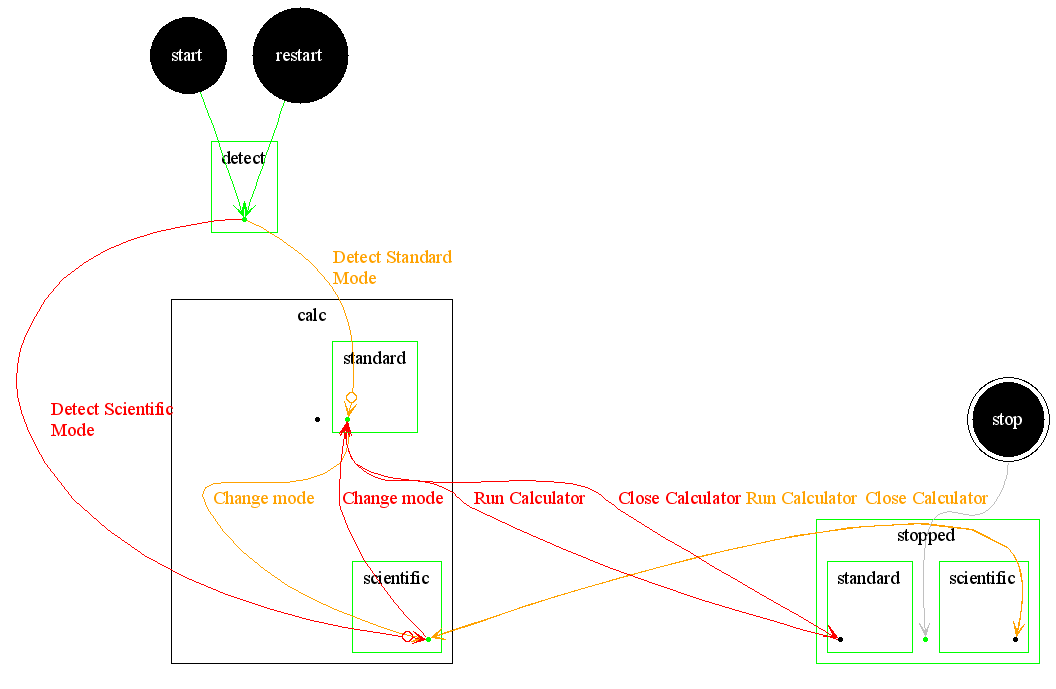
At the highest level, I can partition the Calculator's behavior into two states: running or not running. Next, the calculator has two major modes of operation: standard and scientific. After a little experimentation, I see that if I stop the calculator it will return to the previous mode when it is restarted. These transactions can be modeled as follows:

calc.standard -> calc.scientific
calc.scientific -> calc.standard
calc.standard -> stopped.standard
calc.scientific -> stopped.scientific
stopped.standard -> calc.standard
stopped.scientific -> calc.scientific

One problem with implementing the above in a machine-executable form is that we don't know the state of the calculator the first time we start it. This requires that we code detection of the starting state at the start of the test. This can be done by modeling virtual states that have guarded transitions going out. For example, the following can be used to start the test. The state of "start" is my MBTE's starting state.
start -> detectMode
detectMode (if standard) -> calc.standard
detectMode (if scientific) -> calc.scientific

In addition to the built-in state of "start", my MBTE has states called "restart" and "stop" that are used to restart an application after a failure and to shut down and cleanup at the end of a test. These state transitions should also be added:
restart -> detectMode
stop -> stopped

Now that I have defined the basic high-level transitions, I can put them in an action table and create the automation code needed to make these transitions happen.

The action table may be viewed here. The MBTE generated the following image for the model. (Click the image for a larger version.)


The next step will be to add some validations for the states modeled so far.

While I was running a test on this model, my daughter noticed a potential bug in the calculator that I had not noticed before. This model does not yet contain any calculations. Any idea what the bug may be?

Please send me your questions and suggestions for what should be added to this model next.